Flux
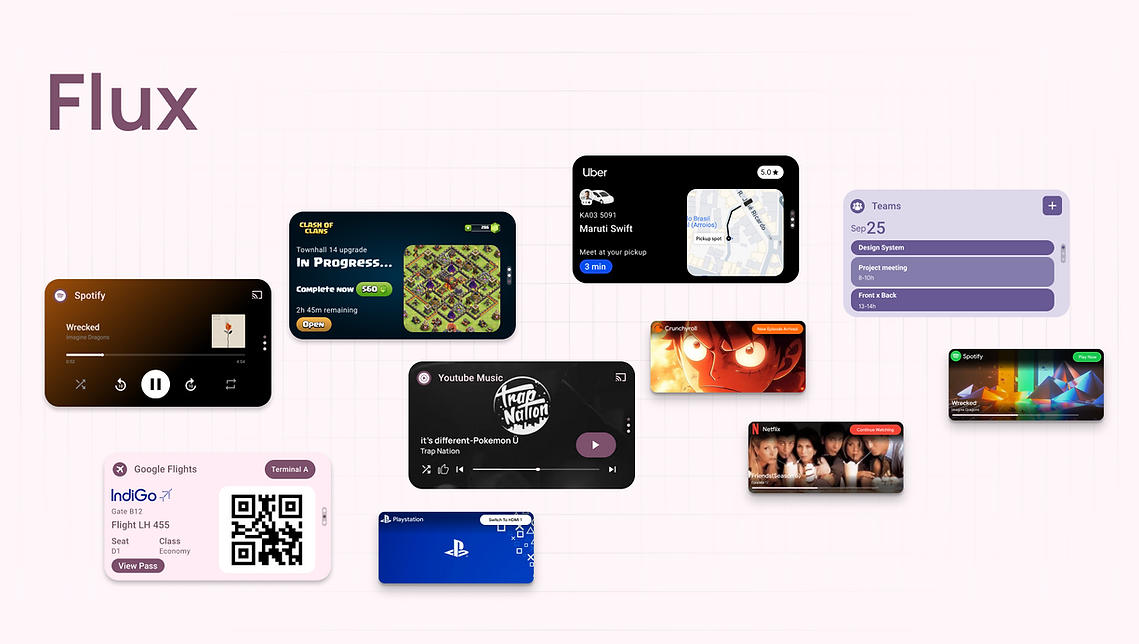
Flux is a unified interface system designed to bridge the gap between Mobile, TV, and Desktop. It uses a Hybrid Stack architecture like a vertical carousel with one dynamic slot that adapts to what user need right now, anchored by two fixed slots to keep my habits intact. By surfacing live actions directly, like tracking a uber ride or detecting a game console. Flux removes the friction of digging through menus, making every interaction faster and every device feel like part of the same family.
Project Type
Concept
Role
UX/UI Design
Year
2023
Context
Overview
Flux is a cross-platform interface system designed to bring consistency to the Android ecosystem.
We use so many different screens today like phones, tablets, and smart TVs but switching between them feels disjointed. Each device has its own confusing layout, forcing us to constantly re-learn where things are.
My goal was to create a Unified Interaction Model, a consistent design element that exists across all devices. By introducing a familiar Dynamic Slot, users can build a habit and no matter which screen they are looking at, they instinctively know exactly where to look for their most important tasks.
Background
I’ve always been a huge Android fan, but I noticed that as I moved from my Pixel to my Tablet, and then to my Android TV, I felt a sense of disconnect.
Even though these devices run the same OS, they feel like completely different worlds. On my phone I have muscle memory. But on my TV, I felt clumsy. I found myself hunting for apps because the interface was totally different. I realized that what was missing wasn't just a feature, but a familiar anchor. I wanted to create a dedicated space that users could get used to a space or familiar accessibility that serves a different purpose on a TV and on a phone, but feels exactly the same to use.

I asked myself that Is it possible to design a unified interface element that bridges the user's interaction gap that feels native and that provides a sense of familiarity across the entire ecosystem, but is smart enough to adapt its behavior to different hardware purposes?
The Problem
Statement
The Challenge
The user's interaction disconnect I realized that the Android ecosystem suffers from a fundamental Human-Machine Interaction problem. It felt strange that while the Operating System is the same, the way I communicate with it changes completely depending on the hardware. On my phone, I am constantly tapping and managing tasks where as on a large display, I am sitting back and consuming content. Because the purpose changes, the interaction breaks. There is no shared language or familiar thread that have a familiar ui anchor across all my android devices.
Research
The psychology i wanted to understand is why switching devices feels so frustrating.
-
The study conducted by Daniel Kahneman shows us that our brains crave familiarity. When an interface looks unknown, we feel cognitive strain and instinctively back away.
-
Humans resist friction. If finding an HDMI input takes 8 clicks on a sony tv but only 1 tap on a phone, our brain marks the tv as hard work.
-
The root cause is fragmentation. While the core OS is Android, the Skin (MIUI, OneUI, Google TV) changes entirely depending on the manufacturer.
Design Process
The Hunt
I audited the OS to see if anything survived this fragmentation. I needed a UI element that exists on every single Android device, regardless of who made it.
The Discovery
Then I stumbled upon the Widget Layer. It is the only UI component that:
-
Exists on Phones, Tablets, Chromebooks, and TVs.
-
Occupies prime screen real estate.
-
Is designed to be customizable.
The infrastructure for a universal anchor already exists, and we just aren't using it correctly. We treat widgets as static mini apps when we should be treating them as a dynamic anchor that can adapt to the user's context.
Before designing the pixels, I mapped out the current user flows to identify exactly where the interaction cost was highest. This diagram reveals the excessive steps required for simple tasks across the different hardwares.

Ideation
I started with low-fidelity paper sketches to figure out the basic structure. I knew the widget layer was the right place for Flux, but I still needed to decide how to organize the content inside it.


The Visual Language
To make Flux feel like a native part of the ecosystem and not just another third-party app I chose to follow Google’s Material You design system strictly.

Applying the visual system to my sketches, I built these components and designed the flux system, and it functions as a vertical carousel holding three distinct slots.
The Dynamic (Slot 1)
The top slot is the Predictive Layer.
It is fully dynamic. It links to the device’s context APIs like Location, Calendar, Media and it predicts exactly what the user needs right now.
For example If headphones are connected, this slot becomes Spotify. If a meeting is starting, it becomes Google Meet.
The Fixed Anchors (Slots 2 & 3)
The bottom two slots are the "Habit Layer."
These are static. The user pre-determines which apps live here example like WhatsApp, Maps .
Because these never change, the user builds muscle memory, knowing their favorite apps are always one swipe away, regardless of what the Dynamic Slot is doing.

Interaction Logic
Smart Scroll to prevent UI redundancy, I implemented a smart scroll rule. When a specific app is triggered by context for example connecting headphones triggers Spotify, the system first checks if that app is already pinned in the fixed anchors. If absent, the Dynamic Slot scrolls into the Spotify player, however if the app is already present in the carousel, it simply auto-scrolls to the existing slot. This ensures the interface prioritizes established shortcuts over creating duplicate instances of the same tool.

Linked Apps
Flux moves beyond static icons by connecting deeply with apps like Spotify, Uber, and Teams to surface live, interactive content. The Dynamic Slot transforms into a mini-interface for each service for becoming a music player, ride tracker, or meeting alert and allowing users to take immediate action without the friction of opening the full application.

Continuity
Leveraging the android framework on ChromeOS, Flux utilizes the exact same widget components as mobile, ensuring seamless visual consistency across devices. The system simply adapts the layout to fit the desktop environment.
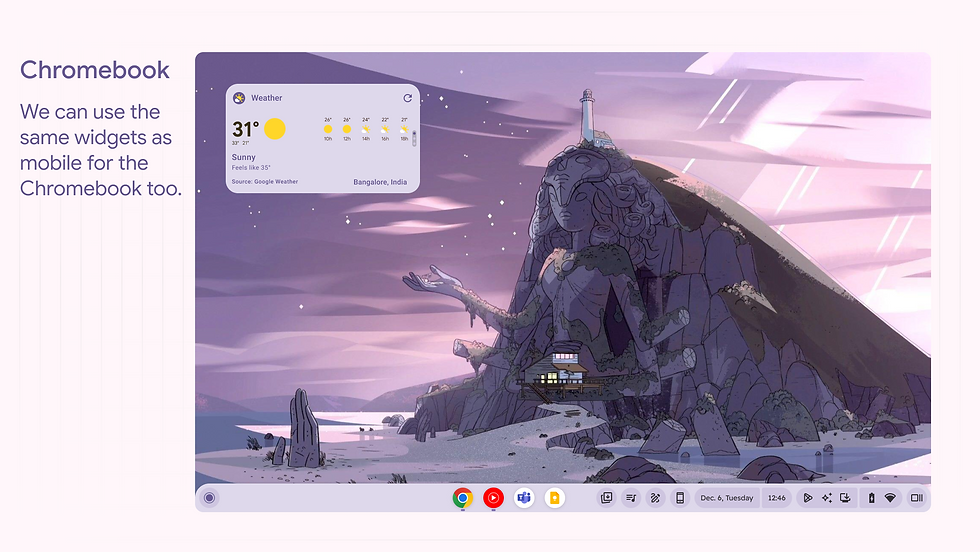
The Dynamic Slot helps to focus on upcoming commitments. When a Microsoft Teams meeting is approaching, the slot automatically adapts to display the event time . This allows users to jump directly into calls from their desktop without opening the calendar app or breaking their current workflow.

Taking it to the big screen
The interface scales up for readability from the couch, optimizing the Linked Apps system for simple remote navigation rather than touch.

Instead of forcing users to hunt through app menus, the Dynamic Slot pulls the most relevant entertainment context like a paused show from a linked app or a connected game console.

Outcome
The Impact
Reducing Interaction Cost
Flux is a functional overhaul of the Android navigation model. By introducing the Dynamic Slot, we fundamentally change the interaction cost for daily tasks:
-
Reduced the steps to perform key actions like resuming media or joining meetings from 5 clicks to 1 or 2 clicks.
-
Reduced cognitive load and removed the need to hunt apps. The system predicts the need, allowing the user to stay in their flow state.
-
Created a unified interaction language that makes owning multiple Android devices (Phone + TV + Laptop) feel like owning one continuous experience.
Key Takeaway
This project taught me that ecosystem design isn't just about visuals, but about shared familiarity across distinct contexts like Mobile and TV. I realized that to build trust in automation, I had to provide the safety of muscle memory, which led me to balance predictive intelligence with fixed habits. Ultimately, Flux moved me beyond designing static screens to designing logic, showing me that I must account for complex behaviors and edge cases to make a system feel truly native.